


Product request
You are looking for a solution:

Select an option, and we will develop the best offer
for you


Live TV Under Load: How to Prepare an IPTV Platform for Sports Events and Peak Traffic
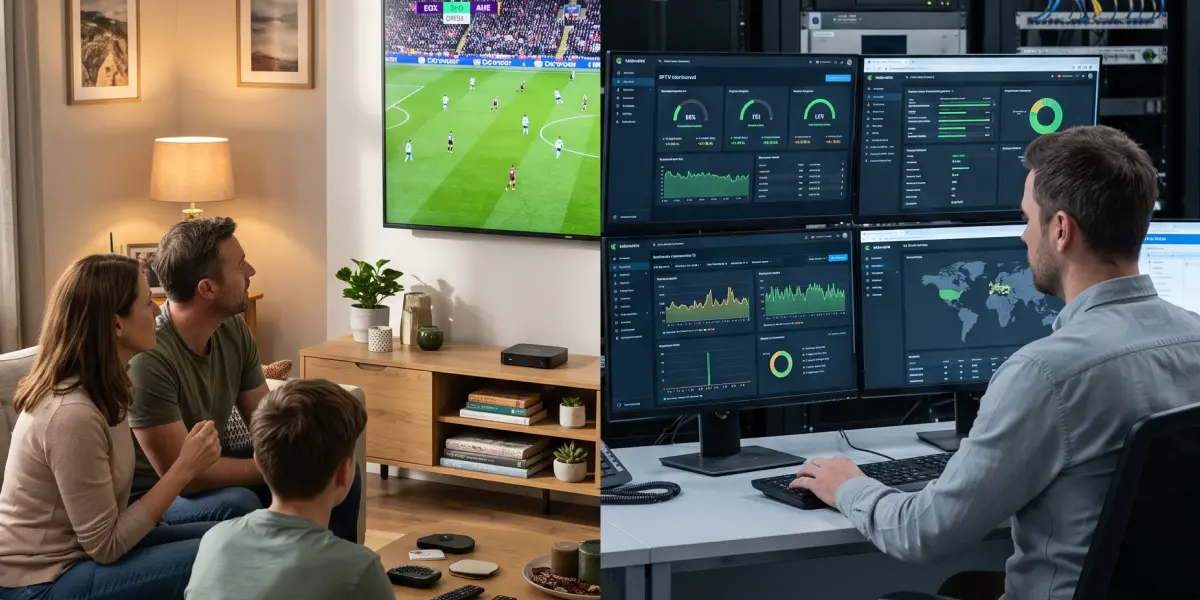
Sports broadcasts create a higher and more concentrated load for an IPTV platform than a typical evening prime time.
In VoD scenarios, users start content at different times, so the load is distributed relatively evenly across the library, CDN, server infrastructure, and devices.
During an important match with peak traffic however, the audience often connects almost simultaneously: users open the application, pass authorization, update the EPG, switch to one channel, and request the same live stream.
As a result, a failure in any part of the live streaming architecture can quickly affect a large number of subscribers – from delayed startup and buffering to channel unavailability and an increase in support requests.
The relevance of this issue is confirmed by data from InterDigital and Parks Associates. Its study, Streaming Live Sports: Where Opportunity Meets Complexity, noted that 57% of viewers face problems when watching sports broadcasts in streaming, including buffering, signal delay, and low image quality.
For an IPTV operator, this is an important signal, indicating that viewers evaluate not only whether a sports channel is included in the package, but also how quickly the broadcast starts, whether quality remains stable, and whether the stream lags behind the real event.
Why Sports Live TV Creates a Specific Load
Peak load during a sports broadcast differs from ordinary audience growth in three ways.
The first is a sharp start. Most viewers connect a few minutes before the match begins or right at the scheduled start time. The second is demand concentration: everyone is watching one channel, one stream, and one live edge. The third is low tolerance for failures.
If a user learns about a goal from a messenger before seeing it in the broadcast, they perceive it as a service problem, even if the video formally continues to play.
For the operator, this means that preparation shouldn't begin with the question “will the server handle it?” but with calculating the entire chain – from the signal source and encoding to CDN, middleware, authorization, client devices, monitoring, and support.
Live sports and low latency live streaming are not only tasks for network engineers, but also operations teams, content managers, support, and the commercial department.
How to Predict a Load Peak
A peak cannot be predicted precisely, but it can be forecast well enough for engineering planning. The operator needs three groups of data: audience behavior history, the event calendar, and current service parameters.
Historical data shows how many users actually connected during similar events. The operator shouldn't look at the average daily audience, but at the maximum simultaneous audience, i.e. the peak number of concurrent viewers (Peak Concurrent Users, PCU), login time before the event starts, distribution by device, the share of viewers on a specific channel, switching frequency, repeat connections, and stream startup errors.
If the previous final attracted 40% of the active base, and the current match is promoted more actively and is available in the basic package, assuming the same peak would be risky.
The event calendar helps identify risk days in advance. For an IPTV operator, this is not limited to major tournament finals. Peaks can be caused by derbies, national teams, combat sports events, European cups, playoffs, local teams, and sometimes the simultaneous overlap of sports, news, game updates, and evening prime time.
Internet providers and video service providers need to exchange data in advance about major events, expected audience, and content delivery requirements. This helps forecast peaks more accurately, plan network capacity, and agree on a CDN strategy before the broadcast starts.
Current service parameters show why past data cannot be used mechanically. The peak is affected by promotional campaigns, free access to the channel, inclusion of the match in the basic package, PUSH notifications, a new mobile app version, growth of the subscriber base, launch of a new device, tariff changes, and the team’s performance during the season. If marketing is actively promoting the match, the technical team should know this in advance, not on the day of the broadcast.
Which Metrics Should Be Collected in Advance
To prepare for peak live TV load, the operator doesn't need general viewing analytics, but a set of operational video streaming performance metrics. The minimum set includes:
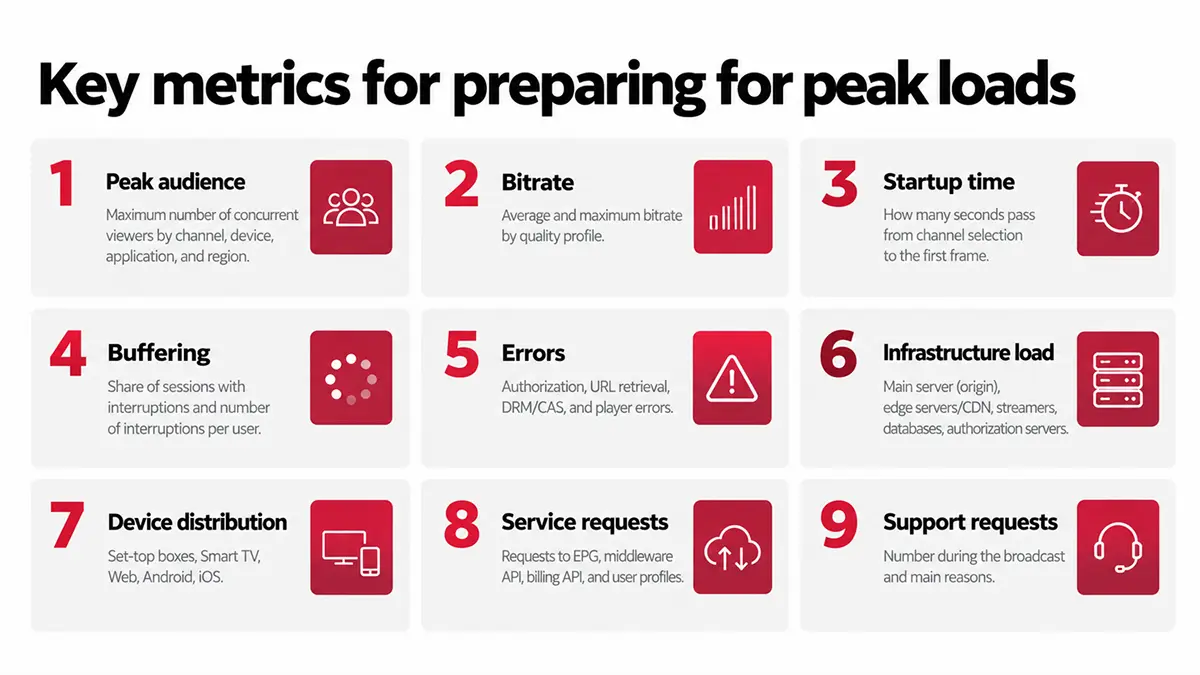
Key metrics for preparing for peak loads
1. Peak audience
Maximum number of concurrent viewers by channel, device, application, and region
2. Bitrate
Average and maximum bitrate by quality profile
3. Startup time
How many seconds pass from channel selection to the first frame
4. Buffering
Share of sessions with interruptions and number of interruptions per user
5. Errors
Authorization, URL retrieval, DRM/CAS, and player errors
6. Infrastructure load
Main server (origin), edge servers/CDN, streamers, databases, authorization servers
7. Device distribution
Set-top boxes, Smart TV, Web, Android, iOS
8. Service requests
Requests to EPG, middleware API, billing API, and user profiles
9. Support requests
Number during the broadcast and main reasons
Some of this data comes from middleware and client applications, including user logins, active devices, authorization errors, channel selection, events on set-top boxes, and API requests.
Another part comes from the CDN and streamers, namely outgoing traffic, the share of requests served from cache, segment errors, load on the central delivery server, and request geography.
Network monitoring completes the picture with data on backbone channel load, interconnections with other networks, regional aggregation nodes, external communication channels, packet loss, and latency.
For example, in Ministra PRO, these indicators should be considered part of the overall operational picture: the platform helps manage users, devices, channels, tariffs, and events, but for full preparation for a live broadcast peak, it needs to be connected with CDN, streamers, network monitoring, and support.
How to Calculate Capacity
This is a simple formula where the expected number of concurrent viewers is multiplied by the average bitrate. If the operator expects 50,000 concurrent viewers at an average profile of 5 Mbps, video traffic alone may reach about 250 Gbps.
But planning should not be limited to egress traffic. In its recommendations for large live broadcasts, Google Cloud identifies two key parameters for CDN planning: peak outgoing traffic rate and maximum number of requests per second.
For HLS v3, the approximate request load can be calculated based on the number of concurrent viewers, the number of requests per segment, and segment duration.
In practice, capacity planning for live TV and sports streaming requires the operator to build in a reserve.
Sports events are risky precisely because a successful broadcast attracts more viewers than expected. If the forecast shows 50,000 concurrent viewers, the infrastructure should not be prepared exactly for 50,000. A reserve is needed, with one level for an ordinary event, and a higher one for a final or exclusive broadcast.
The exact reserve depends on the audience, marketing, regions, and agreements with the CDN, but the principle for capacity planning is the same – it should be based on the peak, not on an average day.
What Depends on Equipment and Infrastructure
The first level of sports streaming infrastructure is signal sources and encoding. If the encoder is unstable, handles dynamic images poorly, or doesn't produce a correct ABR ladder, the CDN will not fix the problem.
For sports, fast motion, frequent shot changes, high field detail, crowds, graphics, and replays are especially important. Quality profiles, GOP, encoding delay, audio and video synchronization, encoder redundancy, and fallback streams should be checked in advance.
The second level is the main delivery server and streamers. A common mistake is to assume that the CDN will fully remove load from the central infrastructure. During a live peak, the main delivery server still remains a critical node, serving segments and stream service files, processing requests from CDN nodes, and withstanding short-term spikes.
For large broadcasts, an additional protective layer is used between the CDN and the central server, accessed by the CDN through intermediate shield nodes.
This approach helps reduce the number of repeated requests to the central infrastructure and lowers the risk of overload during mass viewing.
The third level is CDN and edge. For a local IPTV operator, it's important to decide where delivery is more efficient: own edge nodes closer to subscribers, a commercial CDN, multi-CDN, or a hybrid model.
If the audience is concentrated in several cities, local edge servers can reduce the load on backbone channels. If the audience is distributed across countries, one local node will not solve the problem.
For major events, industry recommendations increasingly refer to multi-CDN as insurance for capacity, regional resilience, and emergency switching, but only if both CDNs are configured identically in advance and switching has been tested before the event.
The fourth level is the access network. If the operator has its own network, it's necessary to look not only at the central data center, but also at bottlenecks in aggregation, peering, uplink, regional nodes, and home segments.
A sports match may reveal that the problem is not in the video platform, but in an overloaded regional section of the network.
What Should Be Purchased or Strengthened
Investments depend on where the bottleneck is located. There is no universal list, but typical areas can be outlined.
If the central delivery server is overloaded, additional servers, a protective intermediate layer between the CDN and central infrastructure, a backup server, load balancing, and failure scenario testing are needed.
If bandwidth is insufficient, it's worth expanding CDN capacity, adding edge delivery nodes, increasing external communication channels, or improving the capacity of interconnections with other networks.
If users are massively receiving login errors, the operator needs to strengthen the middleware API, authorization servers, databases, caching, and request rate limits. In case of device-related issues, application updates, video player optimization, correct adaptive quality selection logic, and testing on popular set-top box and Smart TV models are needed.
Monitoring is a separate investment area. Without it, the team learns about a problem from a support chat. Real-time monitoring panels are needed: active users, startup errors, buffering, CDN outgoing traffic, the share of requests served from cache, load on the central delivery server, API errors, channel availability, and support requests.
It's important not only to buy a monitoring system, but also to configure alerts based on symptoms that actually affect the viewer. These could be a growth in startup errors, a decline in successful sessions, increased buffering, or stream unavailability in a specific region.
Which Processes Should Be Organized Before the Event
Technical preparation for live sports streaming will not work without organizational preparation.
A few weeks before an important match, the operator should conduct a readiness review. This should look at which channels will be at peak, which rights and tariffs are active, which devices are affected, which CDN capacities are confirmed, who is responsible for monitoring, who makes the decision on emergency switching, who communicates with support, and who records the incident.
A single event table is needed, which should include date, start time, expected pre-match growth, concurrent viewer forecast, regions, channels, ABR profiles, CDN, backup streams, responsible engineers, supplier contacts, switching scenarios, critical metrics, and alert thresholds.
Load testing an IPTV platform before a major event is essential, and is usually performed seven to ten days in advance. It's necessary to test the entire user path, not just the video: opening the application, authorization, receiving the channel list, launching the channel, obtaining the link, DRM/CAS, quality switching, restarting the application, and EPG operation.
A common mistake when load testing video streaming is to only establish CDN egress, without checking whether the middleware can handle simultaneous user login.
One to two days before the event, non-critical changes should be frozen. Don't release new application versions, change tariff logic, update CDN configuration without necessity, move channels, or make mass EPG changes.
Before a live peak, stability is more important than new features.
How to Act During the Broadcast
During the match, the team should not work in “let’s see what happens” mode, but according to a pre-agreed instruction. It should describe typical scenarios: CDN live streaming overload, origin failure, growth in authorization errors, channel unavailability on some devices, problems in one region, growth in support requests, and latency differences between platforms.
It's important to distinguish symptoms. If rebuffering grows only in one region, it looks like a network or edge problem. If the channel does not start on all devices, the likely cause is a stream, authorization, DRM/CAS, or middleware error. If the issue affects only one set-top box or Smart TV model, the client application and decoding should be checked. If the load on the billing API grows, it's worth checking whether the platform is calling the external system too often during mass login.
Support should receive short prepared messages: what is known, which devices are affected, what the user should do, and when the next update will be available. During a live event, poor communication makes the technical problem worse: users start restarting applications, logging in again, and creating additional load.
What to Do After the Event
After the live TV broadcast, a technical review should be held while the data is still fresh.
Start with comparing forecast and fact: how many viewers were expected, how many actually came, where traffic spikes and the maximum figures occurred, when growth began, which devices generated more errors, which regions were problematic, which alerts worked (and which didn't), and what support requests were received.
The economics should be reviewed separately. The operator may have handled the peak, but done so in an overly expensive way, such as buying excessive CDN capacity, maintaining a permanent reserve instead of a temporary one, not using caching, or not optimizing ABR profiles. Or the opposite may have happened, where saving on CDN and monitoring led to complaints, compensation, and churn.
After major events, the capacity model should be updated so that the next match is planned not from scratch, but based on actual data.
When planning how to prepare an IPTV platform for peak traffic, particularly surrounding sports events, the focus should be on systematic work with forecasting, analytics, CDN, origin, network, middleware, devices, monitoring, and response processes.
The operator needs to know in advance how many viewers may come, which channels and devices will create the peak, where the potential bottlenecks are in its live streaming architecture, and who makes decisions during an incident.
It's worth investing not only in bandwidth for IPTV scalability, but also in manageability: viewing analytics, user experience monitoring, stream redundancy, edge/CDN capacity, automated events on devices, clear instructions, and post-event analysis.
This is what distinguishes a platform that simply works on an ordinary day, to a service capable of handling a match, a final, or any other major event when the entire audience arrives at the same time.
Recommended
All Content in One Service: Live TV, VoD, Radio, Archive, TimeShift, and EPG in Ministra PRO
A television service has long been more than just a list of channels. Viewers now want to watch live broadcasts, return to a missed program, pause a show, schedule recordings of individual episodes or an entire series using nPVR, or choose a movie from a catalog. At the same time, all these capabilities should feel like parts of a single media environment rather than separate systems.
Interactive TV Trends on Google TV: What to Know in 2027
When choosing a television platform for 2027, businesses need to assess more than picture quality and the app selection. Equally important considerations are how viewers will find content, what capabilities the operator will have, and how predictably the equipment will perform after updates.
How to Reduce Video Delivery Costs Without Compromising Quality: CDN, Edge Cache, and Multi-CDN
As an IPTV/OTT service’s audience grows, so do both revenue and video delivery costs. For an operator, this means additional terabytes of outbound traffic. For a hotel, it means greater pressure on its internet connection. And in the case of maritime transport, it means the video service has to compete with other applications for limited bandwidth.