

Product request
You are looking for a solution:

Select an option, and we will develop the best offer
for you


Ministra PRO on Every Device: An Overview of the IPTV/OTT Ecosystem
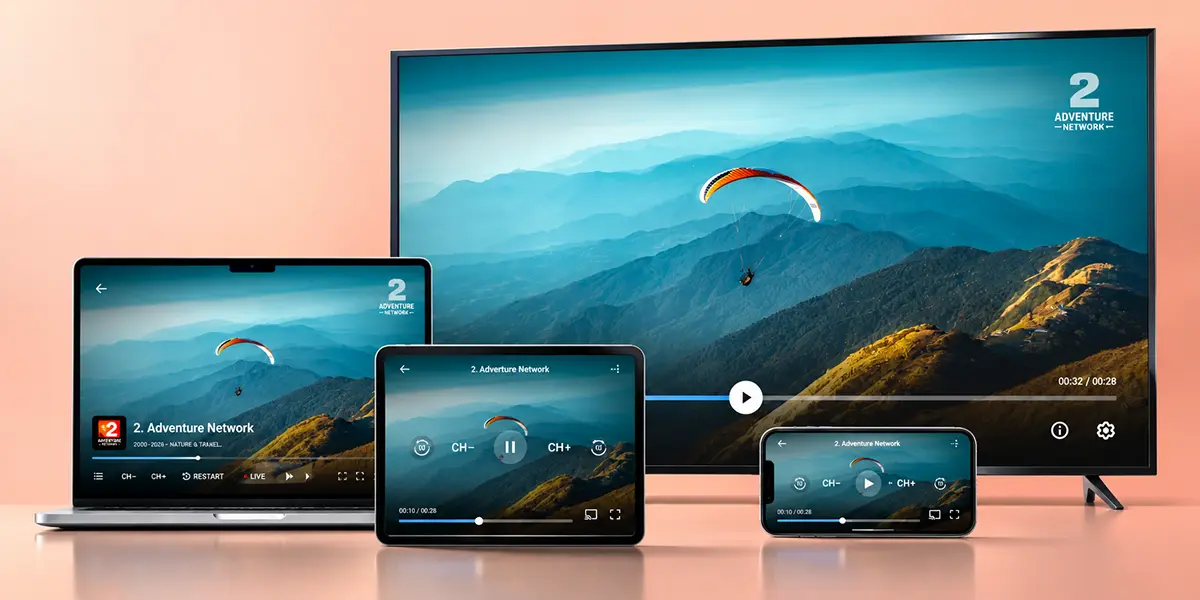
A modern IPTV/OTT service should be available on more than just a set-top box in the living room. A single household may use a Smart TV, a television connected to a set-top box, smartphones, tablets, and a computer.
For subscribers, these are all different ways to watch content. For operators, they form a single system in which devices, subscriptions, content, and access rights must be managed.
The Ministra PRO platform enables operators to deliver such a service across different types of client devices. It supports applications for set-top boxes, television and mobile platforms, as well as viewing through a web player. Operators manage services centrally, while users receive an interface adapted to their particular screen.
For operators of multi-device streaming services, the challenge is not simply to provide IPTV/OTT access on different devices, but also to manage them within a single service. This involves enabling new devices to be linked to an account, configuring limits on the number of devices and available packages, and verifying that content works correctly on each supported platform.
At the same time, users should have an interface suited to their device: remote-control navigation on a TV, touch navigation on a smartphone or tablet, and browser-based viewing on a computer.
What Is a Multi-Device IPTV Ecosystem?
A multi-device IPTV ecosystem brings together the server platform, applications, user accounts, and different devices within a single service. In this architecture, IPTV middleware manages users, subscription plans, content, and connected equipment, while client applications provide access to features on each specific platform.
Ministra PRO supports the following device types and software platforms:
- TV set-top boxes and media players: Linux-based MAG devices, MAG PRO, AOSP, Apple TV with tvOS, Roku, Amazon devices running Android, Amazon devices running VegaOS, and Android TV and Google TV devices.
- Smart TVs: Samsung Smart TVs running Tizen, Philips TVs running Titan OS, and LG TVs running webOS.
- Mobile devices: Android and iOS smartphones and tablets.
- Computers: browser-based viewing through Ministra PRO Web Player.
The main advantage of this multiscreen IPTV architecture for operators is the ability to develop one IPTV/OTT service instead of several independent products for different screens. TV channels, VoD, EPG, service packages, and subscriber access are managed through a common platform.
However, cross-platform streaming support does not require identical interfaces. A television is operated from several meters away using remote-control buttons. On a smartphone, users interact with the application through touch, scrolling, and tabs. The service logic and content structure should therefore remain consistent, while the interaction methods should suit each device.
Operators should also remember that IPTV/OTT support on a particular device does not necessarily mean that every service feature is available. For example, catch-up TV and TimeShift may behave differently depending on the capabilities of the client application, IPTV/OTT platform configuration, video stream source, and content rights.
Before launch, operators should therefore verify which features are actually available on the selected set-top boxes, Smart TVs, and mobile devices, and take these differences into account when designing subscription plans and informing subscribers.
TV Everywhere: How to Deliver an IPTV/OTT Service for the Whole Family
The concept of TV Everywhere (TVE) and the requirement for device compatibility, means that subscribers can access their television service on multiple supported devices without needing a separate subscription for each one.
Consider a typical scenario. There is a Smart TV in the living room, a television connected to a MAG set-top box in the bedroom, and family members also have smartphones and a tablet. The operator needs to bring these devices together within one household and determine which content they can access.
In Ministra PRO, multiple devices can be linked to a single subscriber account (Household). The operator manages accounts, assigns subscription plans, and determines the permitted number of connected devices. Subscribers, in turn, can view the list of registered devices in their account, remove devices they no longer use, and add new ones through authorization. This allows a family to use one IPTV/OTT service across different screens without creating a separate account for each device.
When organizing TV Everywhere for IPTV and OTT services, operators should define two parameters separately: how many devices can be linked to an account and how many viewing sessions can run simultaneously. For example, a subscription plan may allow several registered devices while limiting the number of active sessions.
This enables operators to offer a family plan that supports multiple devices but restricts concurrent viewing. For subscribers, the arrangement is convenient because their television and mobile device remain part of one service. For operators, it provides an opportunity to create more flexible pricing models.
Ministra PRO also offers the ability to resume content from the point where playback stopped after exiting the application. This is convenient when returning to a movie or programme after a break.
IPTV Apps for Smart TVs and Set-Top Boxes
For big-screen viewing, Ministra PRO supports applications for Samsung Tizen, LG webOS, Google TV, tvOS, Philips Titan OS, Amazon VegaOS, Roku, and Fire TV Stick, as well as set-top boxes manufactured by Infomir.
There are two important scenarios for operators. The first is delivering the service directly through a Smart TV app, without a separate set-top box. The second is connecting the television through a set-top box that the operator can select, test in advance, and include in a standard equipment package.
A Smart TV app reduces the amount of additional equipment required by the subscriber. However, operators need to account for differences between TV models, firmware versions, and supported playback capabilities.
A set-top box allows operators to standardize client equipment. For example, an operator can select several MAG models, test them with its own IPTV/OTT infrastructure, and use them as the primary connection option. This simplifies the preparation of instructions, update testing, and troubleshooting.
Ministra PRO offers a classic television interface familiar to IPTV set-top box users. It preserves the established approach to channel selection and remote-control navigation.
For comfortable big-screen viewing, EPG, convenient channel selection, and the ability to control viewing time are particularly important. Ministra PRO supports Catch-up TV and TimeShift for these purposes. Catch-up allows users to open a programme that has already aired from the archive, such as a news broadcast from the previous day. TimeShift is designed for controlling a live broadcast: users can pause live TV, rewind, and continue watching with a delay.
Recording and storing content are handled by the appropriate streaming infrastructure, while Ministra PRO manages the settings and access to these features. Their availability depends on the service configuration and content rights.
Before launching an IPTV/OTT service, operators should verify how Ministra PRO client applications work with their content and settings. It’s important to test the complete user journey: opening the application, authorization, selecting a TV channel, navigating to the EPG, watching archived programmes, controlling playback, and returning to the channel list.
These checks should be performed on the IPTV multiscreen devices intended for deployment.
IPTV and OTT on Mobile Devices
An IPTV mobile app extends viewing beyond the television. Subscribers can open a VoD catalogue on a smartphone, watch an available broadcast on a tablet, or check the programme guide without occupying the main TV screen at home. Ministra PRO supports Android and iOS applications.
The Ministra PRO developers have provided quick navigation between sections, convenient catalogue scrolling, and touch-based playback controls. Simply shrinking a television menu to fit a smartphone screen does not deliver a comfortable user experience.
For mobile viewing, operators can establish separate conditions for content access and video delivery. For example, they may restrict access to certain channels outside a country in accordance with licensing rights or provide lower-bitrate streams to mobile devices to reduce data consumption.
Operators should also consider client application capabilities, supported video formats, and how the service behaves when switching between Wi-Fi and mobile networks.
When IPTV/OTT is used on multiple devices, subscribers need to understand their subscription terms. If the connected-device limit has been reached, for instance, users can remove a previously registered set-top box or another device from their account to free up a slot for a new one. This allows them to manage devices independently within their subscription and replace them when necessary without contacting the operator.
Mobile devices are also frequently used under changing network conditions, with users switching between home Wi-Fi and a mobile network with different available bandwidth. To provide more stable viewing, operators can prepare several variants of the same video stream at different bitrates. This allows a player that supports adaptive streaming to select an appropriate quality level based on current connection conditions.
Web Access to IPTV and OTT Services
Ministra PRO allows users to access the service from any device with a supported browser through its Web Player. This option is particularly convenient for subscribers who want to watch content on a laptop or desktop computer without installing a separate television application.
Ministra PRO Web Player uses the same account and subscription plan system as the other client applications. Users receive access to content according to their subscription terms, while operators don’t need to create separate plans or access rules specifically for browser-based viewing.
Ministra PRO enables operators to build an IPTV/OTT service for different types of screens while maintaining unified management of devices, content, and subscription terms.
For subscribers, IPTV device compatibility means being able to use a familiar service on a television, set-top box, smartphone, tablet, or computer. For operators, it means expanding their offering without creating an independent management system for every platform.
However, a comfortable multi-device experience depends on more than the list of supported equipment. It also requires correct household account configuration, access rights, concurrent session limits, and testing of client applications.
It’s the combination of shared service logic and an interface adapted to each device that makes an IPTV ecosystem convenient for everyday use.
Recommended

QoE vs QoS in IPTV: Why Operators Need More Than Network Monitoring
Every IPTV operator knows the situation: the network dashboard is green, packet loss is within acceptable limits, and latency looks normal–yet complaints keep coming in. Subscribers report that channels take too long to open, the picture freezes during a match, and the app feels sluggish.
IPTV Security: How Ministra PRO Protects Your IPTV Platform
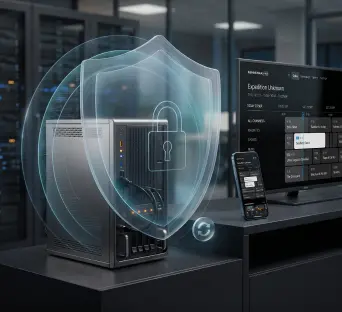
The security of an IPTV service depends on more than protecting the video stream. A vulnerability in a server component can put platform availability, subscriber data, and content access management at risk. IPTV security therefore requires infrastructure updates, API protection, and playback controls working together.

Observability in IPTV: Which Metrics Operators Need to Monitor to Identify Problems Quickly
For an IPTV/OTT operator, service stability depends on more than the availability of servers and channels. The platform may be running without critical errors and the CDN is delivering the video stream successfully, but users still experience slow stream startup, buffering, or denied access to content.